
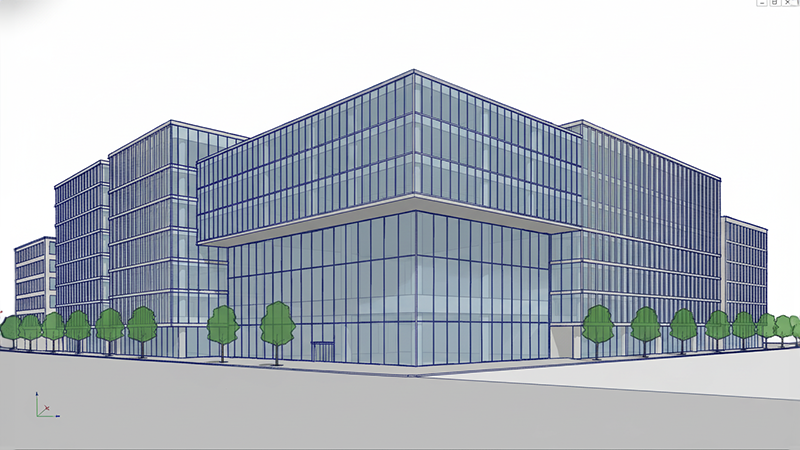
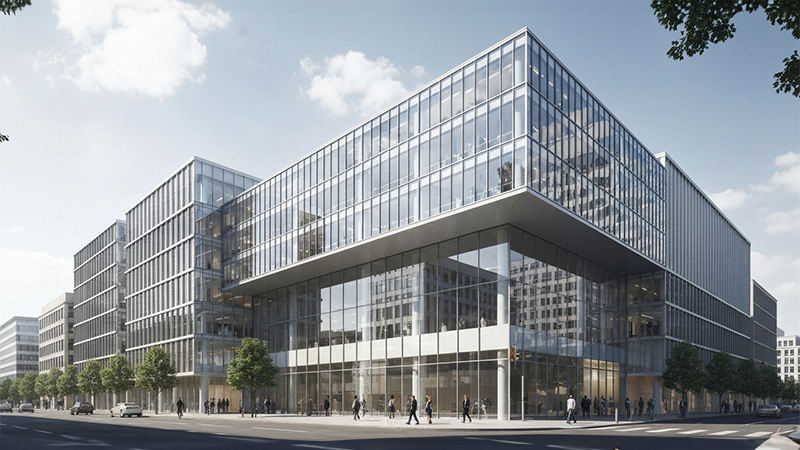
3D Base To Render AI – Convert 3D Models Into
Realistic AI Renders Instantly
Looking for the Best 3D Base To Render AI Tool for architectural visualization and interior design projects?
Bricks N Pixels helps architects, interior designers, 3D artists, and real estate professionals instantly convert raw 3D models into photorealistic AI renders using advanced architectural visualization technology.
The Bricks N Pixels 3D Base To Render AI Tool simplifies the rendering process and eliminates the need for time-consuming manual rendering workflows. Upload your 3D base model, add a prompt, and let AI generate stunning realistic renders within seconds.
Whether you are working on residential architecture, luxury interiors, commercial buildings, landscape concepts, or product visualization, our 3D BASE To Render AI Platform helps you create professional-quality renders faster than ever before.

What is 3D Base To Render AI?
3D BASE To Render AI is an AI-powered visualization technology that converts unfinished 3D models or clay renders into realistic rendered images automatically.
Instead of manually setting up materials, lighting, rendering engines, and post-production workflows, AI understands your 3D geometry and transforms it into a polished architectural visualization instantly.
The Bricks N Pixels 3D BASE To Render AI Tool intelligently analyzes:
- 3D geometry.
- Building structure.
- Camera perspective.
- Materials and surfaces.
- Lighting conditions.
- Interior and exterior environments.
- Architectural style.
This allows architects and designers to generate professional-quality renders without complicated rendering software or lengthy workflows.
Supported 3D Software Workflows
The Bricks N Pixels 3D BASE To Render AI Platform supports workflows from popular 3D software including:
- SketchUp To Render.
- 3ds Max To Render.
- Blender To Render.
- Vectorworks 3D To Render.
- Maya To Render.
- Twinmotion To Render.
You can export screenshots, clay renders, viewport captures, or base models from your preferred software and instantly convert them into realistic AI renders.
Why Designers Use Bricks N Pixels 3D BASE To Render AI?
Architects and visualization artists need faster ways to create realistic renders without spending hours on technical rendering tasks.
The Bricks N Pixels 3D BASE To Render AI Tool helps professionals:
- Convert 3D models into realistic renders instantly.
- Improve client presentations.
- Explore multiple design concepts quickly.
- Reduce rendering time dramatically.
- Eliminate complicated rendering setups.
- Create photorealistic architectural visualizations effortlessly.
Unlike traditional rendering methods, AI-powered rendering allows rapid experimentation and faster approvals.
How the Bricks N Pixels 3D BASE To Render AI Tool Works?
Creating realistic renders from 3D base models is simple and beginner-friendly.
- Clay renders.
- White models.
- SketchUp screenshots.
- Blender viewport renders.
- Maya scene exports.
- Twinmotion previews.
- Vectorworks 3D views.
- JPG.
- PNG.
- TIFF.
- WebP.
The cleaner and clearer the 3D base image, the better the final AI-generated render quality.
- Architectural geometry.
- Camera perspective.
- Depth and spatial composition.
- Structural details.
- Scene hierarchy.
The AI then transforms the raw 3D model into a realistic architectural render using advanced AI rendering models optimized for architecture and interiors.
- Client presentations.
- Portfolio work.
- Design approvals.
- Marketing materials.
- Real estate campaigns.
- Architectural competitions.
You can instantly download high-quality renders directly from the platform.
Key Features of Bricks N Pixels 3D BASE To Render AI
Instant AI RenderingGenerate realistic renders in seconds instead of hours.Architecture-Focused AISpecially optimized for architectural and interior visualization workflows.Realistic Materials & LightingAI automatically adds textures, shadows, reflections, lighting, landscaping, and cinematic mood.Compatible With Major 3D SoftwareSupports workflows from:- SketchUp.
- 3ds Max.
- Blender.
- Maya.
- Vectorworks.
- Twinmotion.
No Complex Rendering Setup Required
No need to configure rendering engines, materials, or lighting manually.
Faster Creative Workflow
Speed up concept development and visualization significantly.
Best Practices for High-Quality 3D BASE To Render Results
To achieve professional architectural renders, follow these expert tips:
Use Clean 3D Base ModelsSimple and organized geometry improves AI understanding.Use Strong Camera AnglesPerspective views create more realistic and cinematic outputs.Keep the Scene Well-ComposedAvoid cluttered scenes or overlapping geometry.Use Detailed PromptsMention:- Materials.
- Architectural style.
- Lighting mood.
- Landscape type.
- Interior style.
- Colors and textures.
Who Should Use This 3D BASE To Render AI Tool?
The Bricks N Pixels 3D BASE To Render AI Architecture Platform is ideal for:
ArchitectsConvert unfinished 3D models into realistic renders instantly.Interior DesignersCreate faster interior visualizations and mood concepts.Real Estate DevelopersGenerate marketing visuals before construction begins.3D ArtistsAccelerate rendering workflows and concept generation.Architecture StudentsBuild professional-quality portfolios without expensive rendering pipelines.Visualization StudiosReduce production time while increasing creative output.3D BASE To Render AI vs Traditional Architectural Rendering
| Feature | 3D BASE To Render AI | Traditional Rendering |
|---|---|---|
| Rendering Speed | Seconds | Hours or Days |
| Learning Curve | Beginner-Friendly | Complex |
| Software Setup | Minimal | Advanced |
| Rendering Workflow | Automated | Manual |
| Cost | Affordable | Expensive |
| Design Iteration | Instant | Time-Consuming |
The Best 3D BASE Render AI tools help designers focus more on creativity and less on technical rendering tasks.
Why Bricks N Pixels is the Best 3D BASE To Render AI Platform?
Bricks N Pixels combines AI technology with real architectural visualization expertise to create fast and professional rendering workflows.
What Makes Bricks N Pixels Different?
AI Built for ArchitectureOur AI is specifically optimized for architectural rendering and visualization workflows.Faster Design ExplorationGenerate multiple rendering concepts instantly.Professional Output QualityCreate client-ready renders without complicated rendering pipelines.Beginner-Friendly InterfaceSimple experience suitable for architects, designers, students, and professionals alike.Scalable Visualization WorkflowPerfect for concept development, presentations, approvals, and marketing campaigns.The Bricks N Pixels 3D BASE To Render AI Tool helps designers transform unfinished 3D models into realistic architectural visualizations faster than ever before.
AI-powered architectural visualization is transforming the way architects and designers create renders. The Bricks N Pixels 3D BASE To Render AI Tool makes it possible to convert raw 3D models into realistic architectural renders within seconds.
From concept visualization to client presentations, AI rendering improves creativity, accelerates workflows, and removes technical complexity.
If you are searching for the Best 3D BASE To Render AI Online Platform, Bricks N Pixels offers a fast, professional, and powerful solution for modern architectural visualization workflows.