
Use cases
Landscape Rendering AI | Realistic Landscape & Garden Visualization
Create Realistic Landscape & Garden Visualizations Instantly.
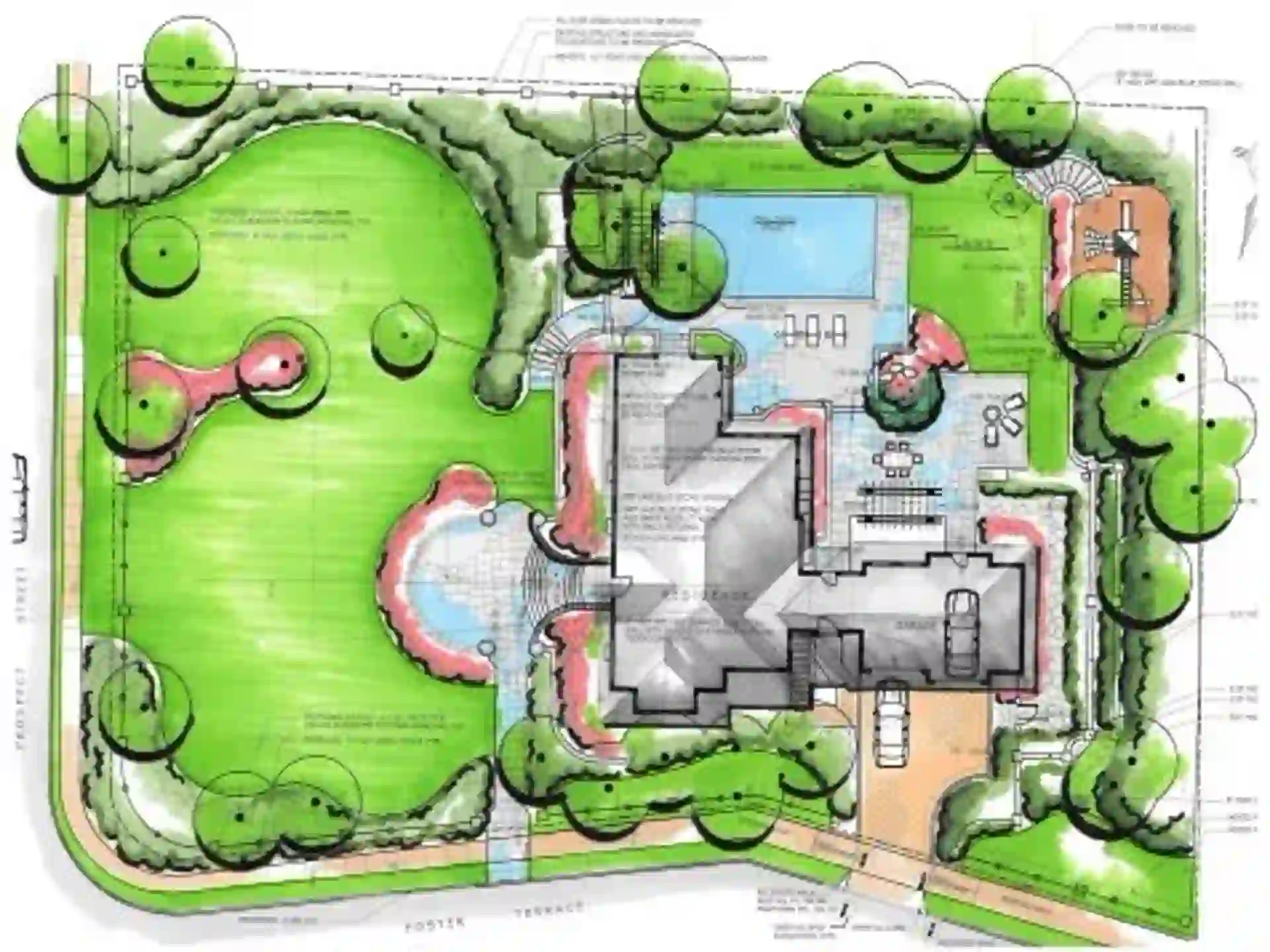
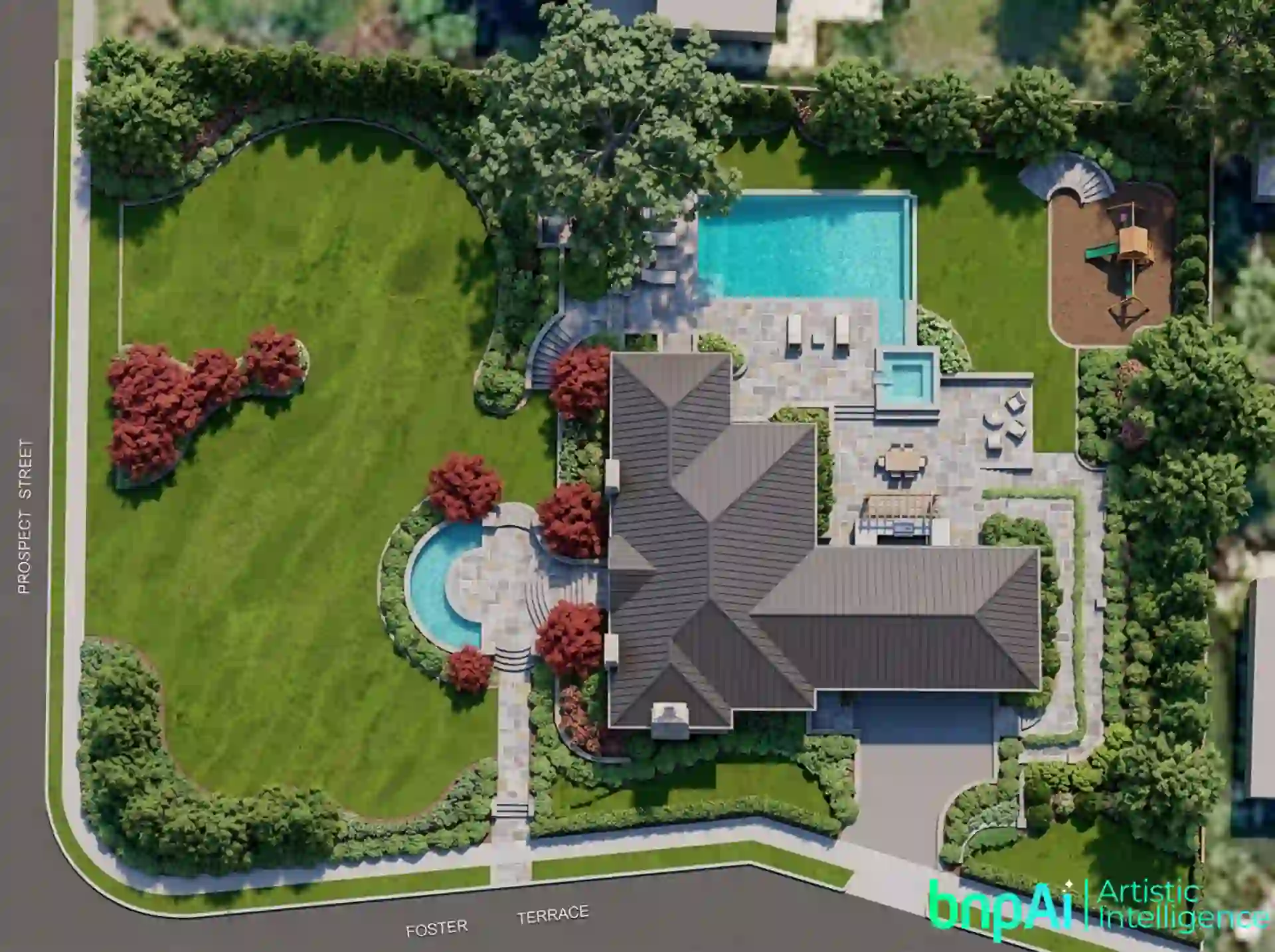
Created by interior-designer @Sajal Kapoor
Landscape Rendering AI – Create Realistic Landscape &
Garden Visualizations Instantly
Create realistic landscape and garden visualizations from your existing design ideas with AI. bnpAI helps landscape architects, architects, designers, developers and planners turn sketches, site plans, 3D views and outdoor concepts into realistic visualizations for design exploration, client presentations and project communication
From residential gardens and villa landscapes to parks, resorts, rooftop spaces and commercial outdoor environments, AI can help you explore different visual directions without rebuilding every concept from scratch.

What is Landscape Rendering AI?
Landscape Rendering AI uses artificial intelligence to turn landscape design inputs into realistic outdoor visualizations.
Instead of building every tree, planting element, material, lighting condition and environmental detail manually, you can start with an existing landscape concept and use AI to explore how the finished space could look.
Depending on the project, you can work with inputs such as landscape sketches, site plans, masterplans, outdoor design concepts and 3D views.
The result is a visual representation that can help communicate the proposed landscape more clearly to clients, teams and other project stakeholders.
AI Landscape Design Generator for Outdoor Concepts
Landscape rendering and landscape design are related, but they serve different purposes.
An AI landscape design generator can help you explore possible outdoor design directions, while landscape rendering focuses on visualizing a design as a realistic image
With bnpAI, you can use AI-assisted visualization to explore ideas for:
- Garden layouts.
- Planting and greenery.
- Pathways and circulation.
- Outdoor seating areas.
- Patios and recreational spaces.
- Water features.
- Landscape lighting.
- Materials and finishes.
- Different landscape styles.
- Daytime and evening visual concepts.
For dedicated residential garden and outdoor-space design, explore our AI Garden Design Generator and AI Backyard Design pages.
Turn Landscape Plans Into Realistic Renders
You can start with an existing landscape concept instead of creating the entire visualization from the beginning
Depending on your project, you can upload:
- Landscape sketches
- Site plans
- Landscape masterplans
- Garden concepts
- 3D model screenshots
- Outdoor design proposals
bnpAI currently supports JPG, JPEG, PNG and WebP image formats.
A clear input image with visible design elements generally gives the AI more useful information to work with.
What Can You Visualize With AI?
Landscape visualization can be used across different outdoor projects, including.
- Residential Landscapes
- Public Parks
- Resort Landscapes
- Rooftop Gardens
- Commercial Landscapes
- Urban Open Spaces
Visualize gardens, lawns, pathways, patios and outdoor living areas around homes and villas.
Explore planting, pathways, seating, recreational areas and landscape character for public environments.
Visualize gardens, outdoor seating, pools, pathways and landscaped areas around hospitality projects.
Explore greenery, seating, pathways, planters and outdoor amenities for rooftop environments.
Create visual concepts for office campuses, retail developments and other commercial outdoor spaces.
Visualize plazas, community areas, pedestrian spaces and public landscape concepts.
How AI Landscape Rendering Works
Creating realistic landscape renders is simple and beginner-friendly.
Explore Landscape Design Ideas With AI
One of the practical advantages of AI visualization is the ability to explore alternatives before committing to a detailed rendering workflow.You can experiment with different combinations of:- Planting character
- Hardscape materials
- Outdoor furniture
- Lighting
- Garden styles
- Landscape atmosphere
- Seasonal or environmental appearance
Landscape Rendering AI for Professionals
Landscape Rendering AI can support different stages of a project, including:
- Early concept development.
- Design exploration.
- Client presentations.
- Internal design reviews.
- Project proposals.
- Marketing visualization.
- Portfolio presentation.
Landscape Rendering AI vs Landscape Design
Landscape design and landscape rendering should not be treated as the same task.
Landscape design focuses on planning the outdoor environment — layout, planting, circulation, materials, functionality and user experienceLandscape rendering focuses on visually communicating that design through realistic imageryAI can support both stages, but the output should still be reviewed against the actual project requirements, dimensions, site conditions and professional design decisionsHow to Get Better Landscape Rendering Results
For more useful AI-generated landscape visualizations.
- Start with a clear and well-organized image.
- Keep important landscape elements visible.
- Describe the desired style and atmosphere.
- Mention important materials and planting characteristics.
- Specify outdoor furniture or amenities when relevant.
- Describe lighting conditions such as daylight, overcast or evening.
- Use perspective views when you want a more presentation-focused result.
- Compare AI output with the original design before using it for project decisions.
| Feature | Landscape Rendering AI | Traditional Rendering |
|---|---|---|
| Rendering Speed | Seconds | Hours or Days |
| Workflow | Automated | Manual |
| Software Complexity | Beginner-Friendly | Advanced |
| Cost | Affordable | Expensive |
| Design Iteration | Instant | Time-Consuming |
| Visualization Output | Fast & Realistic | Manual Setup Required |
The Best Landscape Rendering AI tools help designers focus more on creativity and environmental design rather than technical rendering workflows.
Explore More AI Design & Rendering Tools
If your project includes other architectural or outdoor spaces, you can also explore: